
Interface Overview
هذا المحتوى غير متوفر بلغتك بعد.
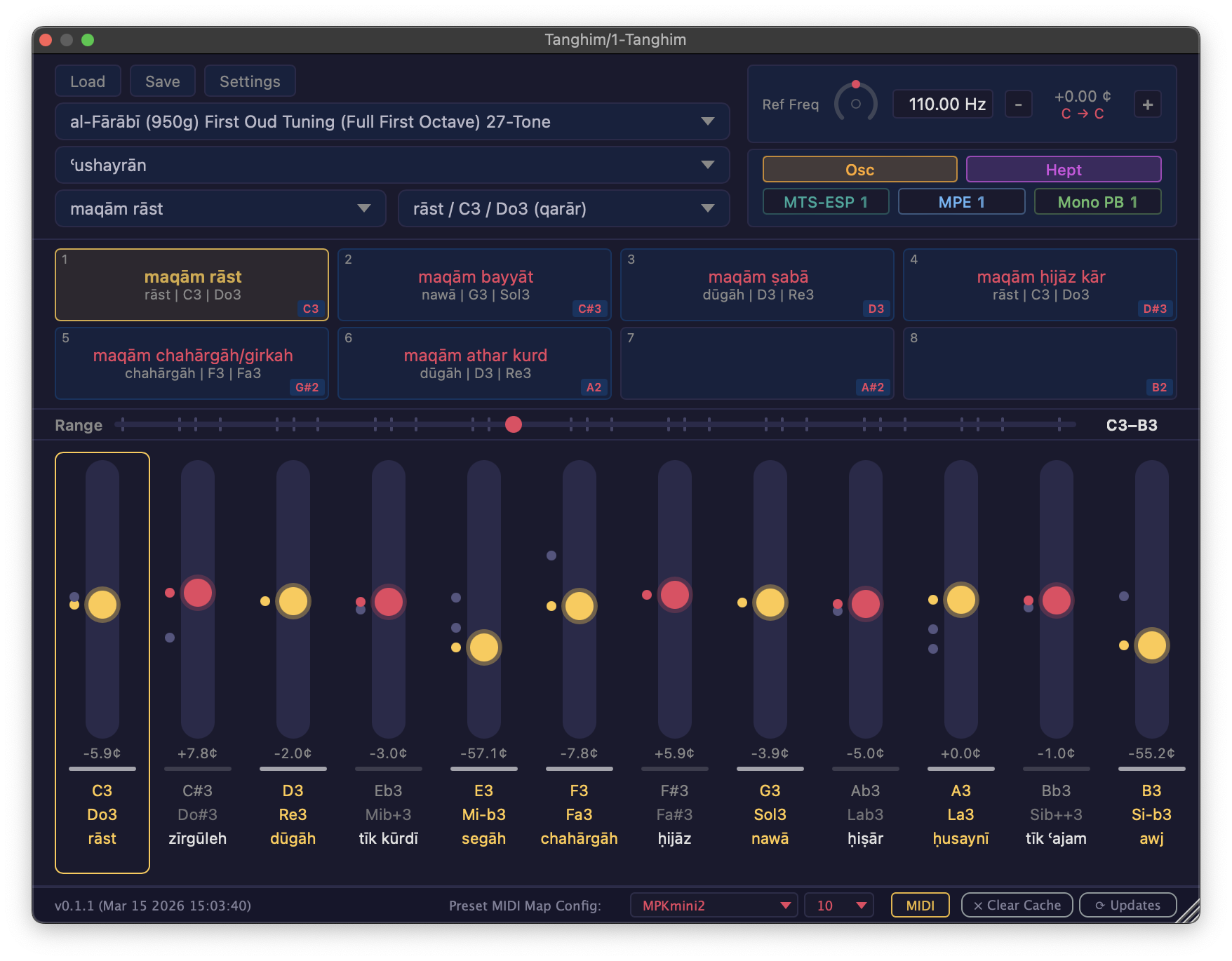
The Tanghīm window is organized into three main areas:
Top Bar
Section titled “Top Bar”- Tuning System Selector (left): choose the tuning system and starting note name. Dropdowns show contextual placeholders (e.g. “Loading…”, “Select Tuning System”) and disable when their prerequisite has not been selected yet.
- Reference Frequency Control (center): adjust the reference pitch. See Reference Frequency.
- Mode Badges (right): status indicators for MTS-ESP, MPE, and Mono PB connections; clickable toggles for the Oscillator and Heptatonic modes.
Middle Section
Section titled “Middle Section”- Maqam Selector: searchable dropdown for maqam and variant/transposition. Cache status indicators (green ticks) show which starting note and maqam combinations have been cached locally.
- Preset Bar: 8 preset slots for saving and recalling maqam configurations. See Presets.
Slider Bank
Section titled “Slider Bank”- 12 chromatic pitch sliders: fine-tune each pitch class; multiple tuning variants per pitch class appear as snap markers. See Slider Bank.
- Range Scroller: navigate the full MIDI range; magnetic snap to C, G, and A positions.
- Piano key indicators: white/black key bars beneath each slider.
Status Bar
Section titled “Status Bar”The Status Bar runs along the bottom of the window:
- Version and build info (left)
- Download status indicator: shows “Downloading…” during data fetches, or “No internet connection” with a Retry button if the connection fails
- MIDI preset mapping controls, MIDI drag export, Clear Cache, and Check for Updates (right)